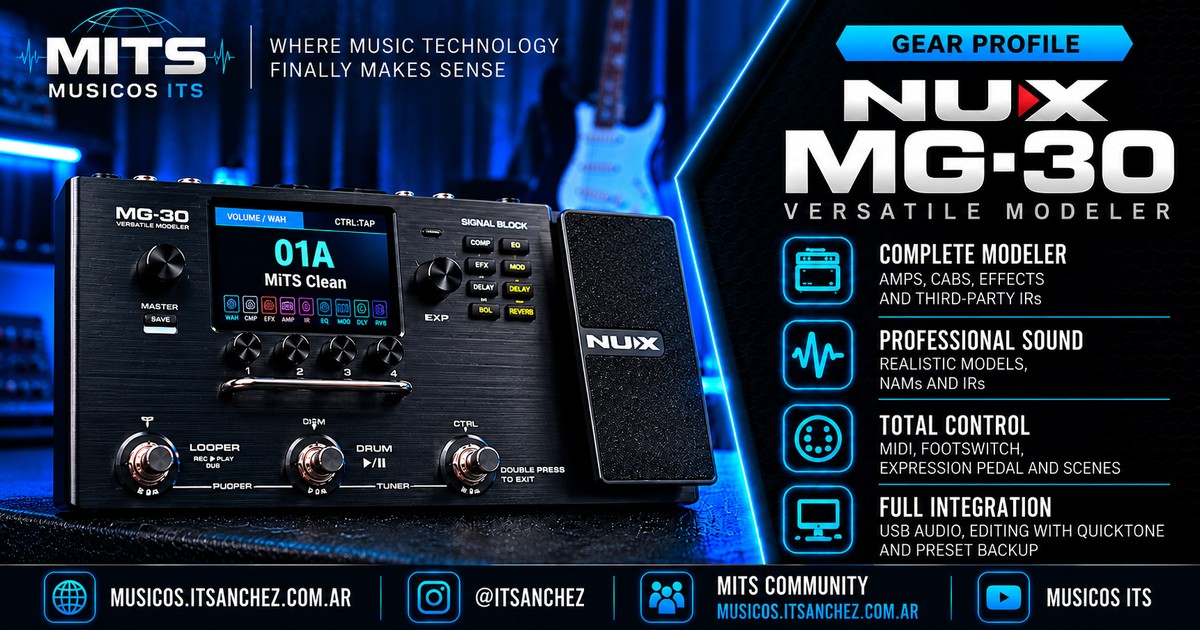
¶ NUX MG-30 — Complete Technical Guide
The NUX MG-30 is a digital multi-effects processor and amplifier modeler for guitar and bass.
It combines amplifier simulations, cabinets, effects, impulse responses (IR), scenes, MIDI control, an integrated expression pedal and USB connectivity for recording and editing.
With the evolution of its firmware, especially the introduction of GEN2, the MG-30 expanded its capabilities with support for Neural Amp Modeler (NAM) models and new processing and configuration options.
At MITS, we use the MG-30 as a platform to experiment with sound, recording, external controllers and different musical setups.
This page brings together manufacturer information, practical explanations and resources that will continue to grow with our own testing.
¶ 📑 Contents
- 🎛️ Overview
- ⭐ Main features
- 🧠 Architecture and processing
- 🎸 Amplifier modeling
- 🔥 NAM and GEN2 firmware
- 🔊 Cabinets and impulse responses
- 🎚️ Effects and signal chain
- 🎹 Presets and Pro Scene
- 🎛️ Expression pedal and footswitch
- 🎚️ MIDI control
- 🎧 Inputs, outputs and connections
- 💻 USB Audio and recording
- 🖥️ QuickTone
- 🔄 Firmware and updates
- 📐 Technical specifications
- 🧪 MITS Lab
- 📚 Resources and downloads
¶ 🎛️ Overview
The MG-30 is part of the NUX family of digital processors.
Its architecture allows different processing blocks to be combined in order to build sounds for:
- Electric guitar.
- Bass guitar.
- Acoustic guitar simulation.
- Direct recording.
- Rehearsals.
- Live performance.
- Integration with traditional amplifiers.
- Use with external controllers.
The MG-30 can work as a standalone processing unit or as part of a larger system.
¶ What can it do?
For example:
Guitar → MG-30 → Monitors
A direct setup for practicing or performing with virtual amplifiers and cabinets.
Guitar → MG-30 → Interface / DAW
An option for working with processed sounds inside a music production environment.
Guitar → MG-30 → Amplifier
The MG-30 can be integrated with traditional amplifiers, taking amplifier and cabinet blocks into account depending on the connection method used.
MIDI Controller → MG-30
External compatible devices can be used to expand control possibilities.
At MITS
We are especially interested in using the MG-30 as part of complete musical systems, combining it with controllers, software and other gear.
¶ ⭐ Main features
- Digital amplifier modeling.
- NUX TS/AC-HD White-Box algorithm.
- Dual NXP RT processors.
- 32-bit AD/DA conversion.
- Approximately 110 dB advertised dynamic range.
- 4-inch color LCD.
- 35 original amplifier models.
- NAM model support through GEN2 firmware.
- 10 NAM slots in the AMP block.
- 1024-sample impulse responses.
- Third-party IR import.
- 11 independent and movable signal blocks.
- Parallel processing options in the post-effects section.
- Three scenes per preset using Pro Scene.
- Configurable MIDI control.
- Integrated expression pedal.
- Connection for external footswitch or expression pedal.
- SEND/RETURN effects loop.
- Four-cable method support.
- USB Audio.
- QuickTone software.
- Firmware updates.
¶ 🧠 Architecture and processing
The MG-30 uses two NXP RT processors for digital signal processing.
NUX uses its TS/AC-HD White-Box modeling technology, designed to reproduce the dynamic behavior of amplifiers.
¶ Audio conversion
The manufacturer specifies:
- 32-bit AD/DA converters.
- Two conversion channels.
- Approximately 110 dB dynamic range.
- 1024-sample impulse-response processing.
¶ Latency
NUX advertises a system latency of approximately 2 ms.
This value corresponds to the manufacturer specification.
It should not automatically be interpreted as the total latency of a setup that includes a computer, audio interface, DAW and additional devices.
MITS Lab
Total latency and system behavior must be measured on specific configurations. We do not consider a commercial specification equivalent to an end-to-end measurement.
¶ 🎸 Amplifier modeling
The MG-30 originally includes 35 amplifier models.
¶ Distribution
| Category | Models |
|---|---|
| Electric guitar | 28 |
| Acoustic guitar | 2 |
| Bass guitar | 5 |
| Total | 35 |
The models cover different response types, gain structures and tonal characteristics.
¶ BIAS parameter
NUX includes a BIAS parameter on certain tube-amplifier models.
This control allows aspects of the model response to be modified.
Not every amplifier model includes this parameter.
¶ How should an amplifier be selected?
Rather than selecting a model only by name, it is useful to consider:
- Guitar and pickups.
- Required gain level.
- Desired dynamic response.
- Cabinet being used.
- Equalization.
- Musical context.
A sound that works well in isolation may behave very differently inside a full mix.
MITS approach
The goal is not to find a magic preset, but to understand what each part of the sound is doing and learn how to adjust it.
¶ 🔥 NAM and GEN2 firmware
One of the most important MG-30 developments is support for Neural Amp Modeler (NAM).
NAM is a neural-network-based modeling technology that can reproduce the behavior of audio equipment from captures.
¶ GEN2 compatibility
NUX added a NAM loader inside the AMP block.
The implementation provides:
10 NAM model slots.
This allows compatible external models to be used inside the MG-30 architecture.
¶ What does NAM add?
It expands the available tones through captures created by third parties.
These captures can represent different amplifier configurations and other pieces of gear.
However, not all NAM models necessarily behave the same way or require the same amount of processing resources.
¶ NAM and IR are not the same thing
It is important to distinguish between the two.
NAM
Uses a neural model to represent the behavior of a piece of gear or processing chain.
IR
Represents the response of a linear system and is commonly used to reproduce cabinets, speakers and microphone chains.
A common setup might be:
Guitar → NAM → IR → Effects → Output
But not every NAM capture requires an additional IR.
Some captures may already include part of the cabinet-chain behavior.
¶ What should be verified?
Before combining NAM and IR, it is necessary to know what is actually included in the capture being used.
Adding a cabinet simulation to a capture that already includes one can produce an unintended result.
Important
NAM compatibility depends on the MG-30 implementation and firmware limitations. It should not be interpreted as guaranteed compatibility with every NAM file that exists.
¶ MITS testing
Some of the areas we work with on the MG-30 include:
- Loading NAM models.
- Comparing internal models with external captures.
- Combining NAM and IR.
- Level adjustment.
- Preset comparison.
- Firmware updates.
- File management.
¶ 🔊 Cabinets and impulse responses
The MG-30 includes cabinet simulations and supports external impulse responses.
¶ Resolution
NUX specifies:
1024 samples per impulse response.
¶ Included cabinets
The unit includes responses for electric guitar, bass and acoustic applications.
Official documentation specifically mentions:
- 8 bass cabinet IRs.
- 3 acoustic IRs.
It also includes technology and content related to NUX Solid Studio cabinet processing.
¶ External IRs
The MG-30 can import third-party impulse responses.
NUX documents a capacity of:
128 user IR slots.
¶ Why does the IR matter?
The cabinet and microphone chain have a major influence on the final tone.
Changing the IR can alter:
- Low-frequency response.
- Presence.
- High frequencies.
- Perceived distance.
- Coloration.
- Behavior inside a mix.
¶ Practical example
We can keep the exact same amplifier and compare different IRs.
AMP A → IR 1
AMP A → IR 2
AMP A → IR 3
This makes it possible to study how much the result changes without modifying the rest of the signal chain.
At MITS
A valid comparison requires controlling volume levels. A louder sound may appear better even when the actual difference is only level.
¶ 🎚️ Effects and signal chain
The MG-30 provides 11 independent and movable processing blocks.
This allows the signal chain to be organized according to the needs of each sound.
¶ Blocks and categories
| Block | Function |
|---|---|
| WAH | Wah and related effects |
| CMP | Compression |
| GATE | Noise reduction |
| EFX | Overdrive, distortion and related effects |
| AMP | Amplifier modeling / NAM |
| IR | Cabinet and impulse response |
| EQ | Equalization |
| MOD | Modulation |
| DLY | Delay |
| RVB | Reverb |
| S/R | External effects loop |
Block availability and position depend on the equipment configuration.
¶ Compressors
Models documented by NUX include:
- Rose.
- K Comp.
- Studio Comp.
¶ Overdrive and distortion
Official documentation includes, among others:
- Dist+.
- RC Boost.
- AC Boost.
- Dist One.
- T Scream.
- Blues Drv.
- Morning Drv.
- EAT.
- Red Dirt.
- Crunch.
- Muff Fuzz.
- Katana Boost.
- Red Fuzz.
¶ Equalizers
- 6-Band.
- Align.
- 10-Band.
- Para.
¶ Modulation
- CE-1.
- CE-2.
- Stereo Chorus.
- Vibrato.
- Detune.
- Flanger.
- Phaser.
- U-Vibe.
- Tremolo.
- Rotary.
- Harmonist.
¶ Delay
- Analog.
- Digital.
- Modulation.
- Tape.
- Reverse.
- Pan.
- Duotime.
- Phi.
¶ Reverb
- Room.
- Hall.
- Plate.
- Spring.
- Shimmer.
¶ Parallel processing
The MG-30 provides parallel-processing options in the post-effects section.
This expands the ways in which blocks can be combined.
Important
Effect order changes the result. A delay before distortion will not behave the same way as a delay after distortion.
¶ 🎹 Presets and Pro Scene
The MG-30 stores complete sound configurations as presets.
A preset can include a combination of:
- Amplifier.
- Cabinet or IR.
- Effects.
- Equalization.
- Parameters.
- Control assignments.
- Scenes.
¶ Pro Scene
The Pro Scene feature allows three different scenes to be used within the same preset.
Scenes can include changes in:
- Amplifier models.
- Effect models.
- Parameters.
- Sound configuration.
¶ Musical example
A single preset can be organized like this:
| Scene | Application |
|---|---|
| Scene 1 | Clean sound |
| Scene 2 | Rhythm sound |
| Scene 3 | Lead sound |
This makes it possible to organize several sections of a song without constantly switching between full presets.
¶ GEN2 and scenes
GEN2 firmware adds functions related to scene saving and scene copying.
¶ Presets vs. scenes
Preset: stored overall configuration.
Scene: a variation within that preset.
Understanding this difference is especially useful when organizing the MG-30 for live use.
At MITS
We are especially interested in teaching how to organize presets and scenes in order to reduce the number of operations required during a performance.
¶ 🎛️ Expression pedal and footswitch
The MG-30 includes an integrated expression pedal.
It can be used for compatible functions such as:
- Volume.
- Wah.
- Control of assignable parameters.
¶ External control
The unit provides an EXP1 connection for an external expression pedal or compatible controller.
NUX documents support for the NMP-2 LITE to expand control options.
¶ Does the MG-30 have a Stomp Mode?
NUX states that the MG-30 does not include a dedicated Stomp Mode equivalent to the one found on some other processors.
However, it can control blocks through the functions available on CTRL and a compatible external footswitch.
This allows stomp-like control configurations for certain applications.
Important
Footswitch block control and MIDI control are different mechanisms. Their possibilities must be evaluated according to the function and firmware being used.
¶ 🎚️ MIDI control
The MG-30 includes MIDI functions that allow it to be integrated with external equipment and controllers.
NUX confirms that MIDI CC messages can be customized through QuickTone.
¶ What is MIDI?
MIDI is a protocol used to communicate instructions between instruments, controllers and other musical equipment.
It does not transmit the guitar audio itself.
It transmits control messages.
¶ Program Change — PC
Program Change messages are commonly used to select programs or presets.
¶ Control Change — CC
Control Change messages can be used to control compatible functions or parameters.
Depending on each device, they can activate effects, modify values or trigger other operations.
¶ Possible applications
- Preset selection.
- Control of assignable functions.
- Integration with external controllers.
- Automation from compatible software.
¶ Chocolate MIDI Plus
One of the areas we are investigating at MITS is the integration of the MG-30 with controllers from the Chocolate MIDI family.
The goal is to study configurations that can:
- Change presets.
- Control effects.
- Reduce the number of operations needed during a performance.
- Customize footswitch behavior.
¶ MIDI configuration
To reproduce a configuration correctly, the following should be documented:
- Exact controller model.
- Firmware version.
- Connection type.
- MIDI channel.
- Messages being sent.
- Values being used.
- Function assigned on the MG-30.
MITS Lab — Chocolate MIDI Plus
We will document the configurations that we physically validate. We will not publish CC assignments, scene changes or configuration files as working solutions until their real behavior has been verified.
¶ 🎧 Inputs, outputs and connections
The MG-30 provides several connections for integration with external equipment.
¶ Main connections
- Instrument input.
- Left and right audio outputs.
- Headphone output.
- SEND.
- RETURN.
- EXP1.
- USB.
¶ Effects loop
The SEND/RETURN loop allows external equipment to be inserted into the signal chain.
NUX allows the loop position to be configured and provides serial or branch options depending on firmware.
¶ Four-cable method
The MG-30 supports the four-cable method for integration with compatible amplifiers.
This allows certain effects to be placed before the amplifier preamp and others after it.
¶ Conceptual example
Guitar → MG-30 → Amplifier input
Amplifier send → MG-30 return
MG-30 send → Amplifier return
The exact connection depends on block configuration and SEND/RETURN routing.
Important
Before connecting equipment with the four-cable method, check the official diagram, signal levels and amplifier configuration.
¶ Outputs and applications
The outputs can be used for different recording, monitoring and amplification configurations.
Routing options should be verified according to output mode and setup.
¶ 💻 USB Audio and recording
The MG-30 can operate as a USB audio interface.
This allows it to be integrated with a computer for recording.
¶ Applications
- Guitar recording.
- Bass recording.
- Monitoring.
- Computer playback.
- DAW integration.
¶ Recording software
It can be used in an environment compatible with USB audio interfaces.
Possible applications include:
- Logic Pro.
- Reaper.
- Ableton Live.
- Other compatible DAWs.
¶ USB Routing
Firmware development added additional USB routing options.
These include a Loopback function.
¶ Audio buffer
NUX recommends initially using a buffer size of:
128 samples.
This is a manufacturer recommendation, not a guarantee of identical latency on every computer.
¶ Recording latency
Total latency depends on several factors:
- Operating system.
- Drivers.
- Sample rate.
- Buffer size.
- Software.
- Additional processing.
At MITS
To compare recording configurations correctly, the complete system must be measured rather than relying only on the processor's advertised latency.
¶ 🖥️ QuickTone
QuickTone is NUX's official software for editing and managing the MG-30 from a computer.
¶ Main functions
- Preset editing.
- Amplifier configuration.
- Effect editing.
- Parameter management.
- Configuration of compatible MIDI functions.
- Management of device resources.
¶ Versions
NUX distributes different QuickTone versions associated with different firmware generations.
GEN2 requires QuickTone GEN2.
A QuickTone version designed for another firmware generation should not be assumed to support every function correctly.
¶ Backups
Before updating firmware or making major configuration changes, it is recommended to back up available resources.
It is important to distinguish between:
- Presets.
- NAM models.
- Impulse responses.
- Global configuration.
It should not be assumed that exporting a preset or creating a QuickTone backup automatically includes every external resource being used.
MITS recommendation
Before an update, verify separately which files and settings are backed up and how they can be restored.
¶ 🔄 Firmware and updates
The MG-30 has received several generations of firmware that added new functions.
¶ Firmware V5
Features documented by NUX include:
- Pro Scene.
- Serial and Branch options for SEND/RETURN.
- USB Loopback.
- Metronome.
- Improvements related to BPM and delay subdivisions.
- External footswitch assignment for moving forward or backward through scenes.
¶ GEN2 firmware
Main additions include:
- NAM loader.
- 10 NAM slots.
- New effect models.
- New global configuration options.
- Improvements related to presets and scenes.
- Scene copy functions.
¶ New GEN2 effects
NUX documents additions such as:
- FULL-OD HP.
- HORSEMAN.
- NOB ODR.
- RIV BLUEFLOG COMBO.
- TURBO OD.
- MONO OCTAVE.
¶ Compatibility
NUX states that:
GEN2 firmware and QuickTone GEN2 must be used together.
The manufacturer also warns that update files published for the English-market version of the product should not be installed indiscriminately on units intended for other regions.
¶ Versions published by NUX
At the time this page was prepared, the official website listed:
| Component | Published version |
|---|---|
| GEN2 Firmware | 1.0.5 |
| QuickTone GEN2 | 2.6.7.16 |
| V5 Firmware | 5.0.2 |
These versions may change.
The official support section should always be considered the definitive reference.
¶ Recommended procedure
- Identify the current version.
- Confirm the device variant.
- Read the official release notes.
- Back up presets and external resources.
- Download the correct firmware.
- Follow the official update procedure.
- Install the compatible QuickTone version.
- Verify presets, NAM models and IRs.
- Confirm overall operation.
Important
Do not update firmware without confirming that the file is compatible with the unit. External resources should not be assumed to survive an update automatically.
¶ 📐 Technical specifications
| Feature | Specification |
|---|---|
| Manufacturer | NUX |
| Model | MG-30 |
| Type | Digital processor / modeler |
| Processing | 2 NXP RT processors |
| Modeling | TS/AC-HD White-Box |
| AD/DA converters | 32-bit |
| Advertised dynamic range | Approximately 110 dB |
| Advertised system latency | Approximately 2 ms |
| Display | 4" color LCD |
| Original amplifier models | 35 |
| Electric guitar amplifiers | 28 |
| Acoustic amplifier models | 2 |
| Bass amplifier models | 5 |
| NAM | Supported through GEN2 |
| NAM slots | 10 |
| IR resolution | 1024 samples |
| User IR slots | 128 |
| Signal blocks | 11 independent and movable |
| Parallel processing | Post-effects options |
| Pro Scene | 3 scenes per preset |
| Expression pedal | Integrated |
| External footswitch | Supported |
| SEND/RETURN | Yes |
| Four-cable method | Yes |
| MIDI | Yes |
| USB Audio | Yes |
| Editor | QuickTone |
| GEN2 firmware | Available |
Technical note
Latency and dynamic-range values correspond to specifications published by NUX. They are not independent measurements performed by MITS.
¶ 🖼️ Gallery
The gallery contains product images, connections and interface details.
Official images and our own material will be added as documentation grows.
¶ 🧪 MITS Lab
The MG-30 is one of the devices we use for different tests and tutorials.
Our goal is to investigate its real capabilities and explain how to reproduce the procedures.
¶ 🔥 NAM
- Model import.
- Capture comparison.
- Compatibility.
- Differences between models.
- IR integration.
¶ 🔊 Presets and levels
- Preset organization.
- Volume comparison.
- Level matching.
- Live-performance setup.
¶ 🎛️ External controllers
- Chocolate MIDI.
- Chocolate MIDI Plus.
- MIDI messages.
- Preset switching.
- Effect control.
- Custom configurations.
¶ 🎹 Pro Scene
- Scene organization.
- Changes inside a preset.
- Musical applications.
- Integration with external controllers.
¶ 💻 Recording
- USB Audio.
- DAW integration.
- Monitoring.
- Routing.
- Guitar and bass recording.
¶ 🔄 Firmware
- Updates.
- Compatibility.
- Backups.
- Configuration recovery.
- Changes between firmware generations.
¶ 🎸 Musical applications
- Clean sounds.
- Rhythm sounds.
- Lead sounds.
- Amplifier combinations.
- Recording in a musical context.
¶ 🎬 MITS Videos
On our channel we publish tutorials, tests and practical experiences related to the MG-30.
Topics include:
- Firmware updates.
- GEN2.
- NAM.
- Preset configuration.
- Sound organization.
- MIDI control.
- Integration with other equipment.
Official MITS channel:
https://www.youtube.com/@MusicosITSanchez
This section will be expanded with direct links to the relevant videos.
¶ 🛠️ MITS Tools
¶ MITS Level Match
One of the challenges when working with multiple presets is keeping volume levels consistent.
MITS Level Match is a tool developed to help compare signal levels.
It can be used as part of an adjustment and comparison process.
It does not replace listening or musical judgment.
¶ General procedure
- Select two presets.
- Keep test conditions comparable.
- Measure their levels.
- Identify differences.
- Adjust the relevant parameters.
- Measure again.
- Verify the result by playing.
MITS philosophy
Tools help us understand and repeat a process. They do not replace learning or musical decisions.
¶ 📚 Resources and downloads
¶ NUX
Official MG-30 page:
https://nuxaudio.com/product/mg30/
¶ Manuals
The official support section provides manuals in several languages, including Spanish.
¶ Firmware
NUX publishes firmware for different generations and operating systems.
¶ QuickTone
The official editor provides access to different device-management functions.
¶ Drivers
NUX also publishes ASIO drivers for Windows.
¶ MITS resources
This section will progressively include:
- Tutorials.
- Configuration guides.
- Update procedures.
- MIDI references.
- Verified configurations.
- Sound tests.
- Measurements.
- Musical examples.
Any files we share will be accompanied by explanations so that each musician can understand and adapt them.
¶ 🎯 How we work
At MITS, we do not only want to show what a piece of gear can do.
We want to understand how it works, verify its real possibilities and teach how to use it.
TEST → MEASURE → UNDERSTAND → TEACH
The MG-30 is an excellent platform for this methodology because it combines modeling, digital processing, external control and recording.
As we complete new tests, this page will continue to grow.
The technical information on this page is based on official NUX documentation. Manufacturer specifications are distinguished from tests and measurements performed by MITS. Configurations that have not yet been verified will be clearly identified.