¶ M-VAVE ANN BlackBox
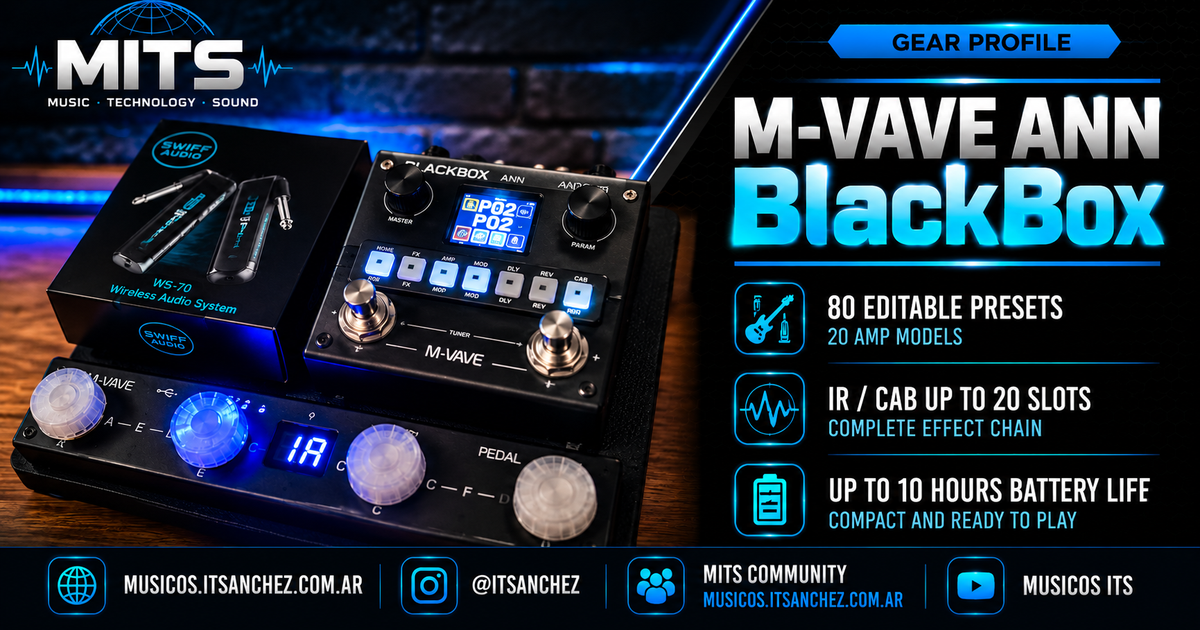
The M-VAVE ANN BlackBox is a compact multi-effects processor for guitar and bass that combines amp modeling, effects, IR-based cabinet simulation, editable presets, and a rechargeable battery.
At MITS, we mainly use it as part of a compact pedalboard, combined with an M-VAVE Chocolate MIDI controller to expand preset control and make the setup practical for playing and rehearsing.
¶ Main specifications
| Feature | Specification |
|---|---|
| 🎛️ Presets | 80 editable presets |
| 🎸 Amp models | 20 preamps |
| 🔊 IR / CAB | Up to 20 slots |
| 🔋 Battery | Up to 10 hours |
| 🎧 Monitoring | Headphone output |
| 🔵 Connectivity | Wireless audio |
| 💻 USB | Works as an interface / USB sound card |
| 📱 Editor | M-EFCS |
| 🎸 Instruments | Guitar and bass |
The main specifications were checked against the official information published by M-VAVE.
¶ Effects chain
The ANN BlackBox provides a complete signal processing chain.
Available blocks include:
- Gate
- Boost / Comp
- Amp
- EQ
- Modulation
- Delay
- Reverb
- CAB / IR
This makes it possible to build complete sounds directly inside the unit without necessarily relying on external plugins.
¶ Presets
The BlackBox provides 80 editable presets.
At MITS, we use presets as a starting point to build sounds designed for real-world practice, rehearsal, and recording situations.
One important aspect when working with multiple presets is maintaining consistent volume levels between clean, crunch, and lead sounds.
For this, we use MITS Level Match as a reference tool to measure and adjust level differences.
¶ MITS Presets
Below you can download some of the presets used in our videos.
These presets are not intended as a “magic” solution. They are real configurations used at MITS and can serve as a reference for each player to adapt the sound to their guitar, monitoring system, and playing style.
¶ 🎸 Preset 1 — Rhythm
File:
Description:
High-gain sound designed for rhythm playing and right-hand dynamics.
¶ 🎸 Preset 2 — AC30 Clean
File:
Description:
Clean sound used as a base for practice and accompaniment.
¶ 🎸 Preset 3 — Lead
File:
Description:
Lead sound with higher gain and an adjusted level to stand out when playing solos.
¶ IRs - CABs
metaltuneamericanpack2-free.zip
¶ How we use the BlackBox at MITS
The BlackBox is currently part of a compact pedalboard together with:
- M-VAVE Chocolate MIDI
- SWIFF Audio wireless system
- Aluminum pedalboard
- External Cry Baby when needed
The idea behind this setup is to minimize the time required to start playing.
In our Home Studio, the BlackBox output is connected to a PreSonus Studio 26c.
Using the interface's direct monitoring, we can play without opening Logic, loading a project, or using plugins.
¶ Chocolate MIDI + BlackBox
One of the combinations we regularly use is:
ANN BlackBox + M-VAVE Chocolate MIDI
The controller provides easier access to presets and functions without relying only on the physical controls of the BlackBox.
At MITS, we already have dedicated content about this integration, and we will continue adding configurations and practical tests.
¶ Preset level matching with MITS Level Match
When using multiple sounds within a pedalboard, one of the most common problems is having different perceived volume levels between presets.
To avoid this, we measure the sounds using MITS Level Match.
This allows us to compare presets and adjust their levels before using them for practice, recording, or rehearsals.
¶ MITS Level Match
https://musicos.itsanchez.com.ar/en/tools/level-match
¶ M-EFCS Software
M-VAVE uses M-EFCS as the official software for editing and managing the ANN BlackBox.
It is available for:
- Windows
- macOS
- iOS
- Android
¶ Firmware
M-VAVE publishes official firmware and software for the ANN BlackBox in its download section.
At the time this profile was prepared, the published ANN BlackBox version is:
Firmware V20 — 31/01/2026
Before updating any firmware, we recommend backing up important presets and configurations.
¶ Firmware V22 — November 12, 2026
¶ ANN BlackBox V22: USB Audio Fixes and New Features
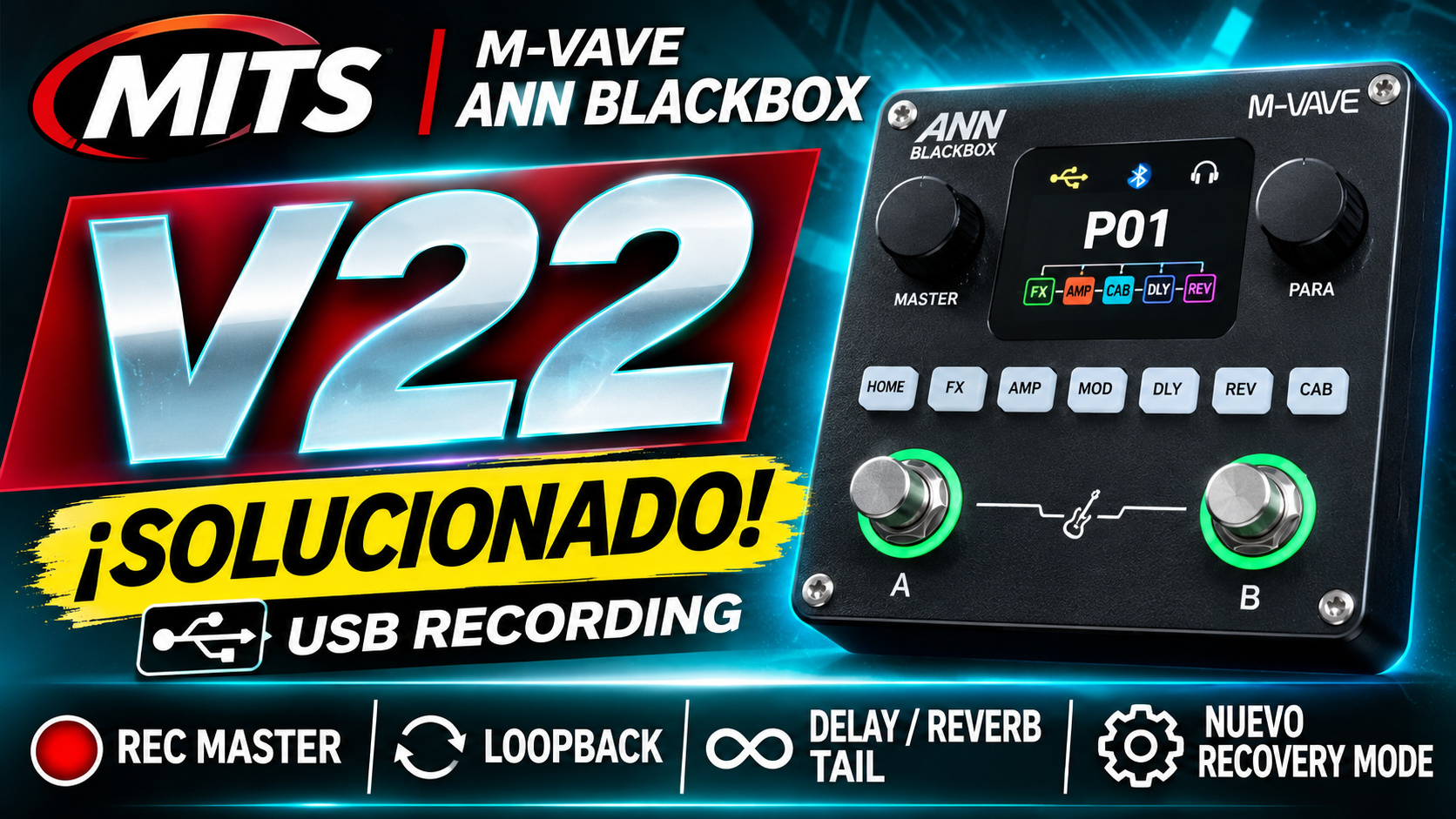
M-VAVE released firmware V22 for the ANN BlackBox on November 12, 2026.
This update mainly focuses on fixing USB recording issues introduced in firmware V21, adding new recording controls, and improving device stability.
The main improvements include:
- Fixed USB guitar recording issues.
- Restored Loopback recording functionality.
- New Rec Master feature.
- New Recovery Mode for firmware recovery.
- Improved Bluetooth reconnection.
- Visual fixes in the CHAIN and PLAY screens.
- Correct NAM model identification when using the desktop software.
¶ 1. USB Audio Recording Fix
One of the most important fixes in this version concerns the ANN BlackBox's functionality as a USB audio interface.
In firmware V21, an issue was reported where some devices recognized the BlackBox as an audio interface but did not receive the guitar signal.
According to the V22 release notes, M-VAVE fixed anomalies in the USB recording signal path and restored guitar recording functionality.
The update also fixes audio processing issues that could occur when switching Loopback and Rec Master settings.
Important: These fixes have been announced by the manufacturer. Their effectiveness should be confirmed through real-world testing.
¶ 2. USB Recording and Loopback
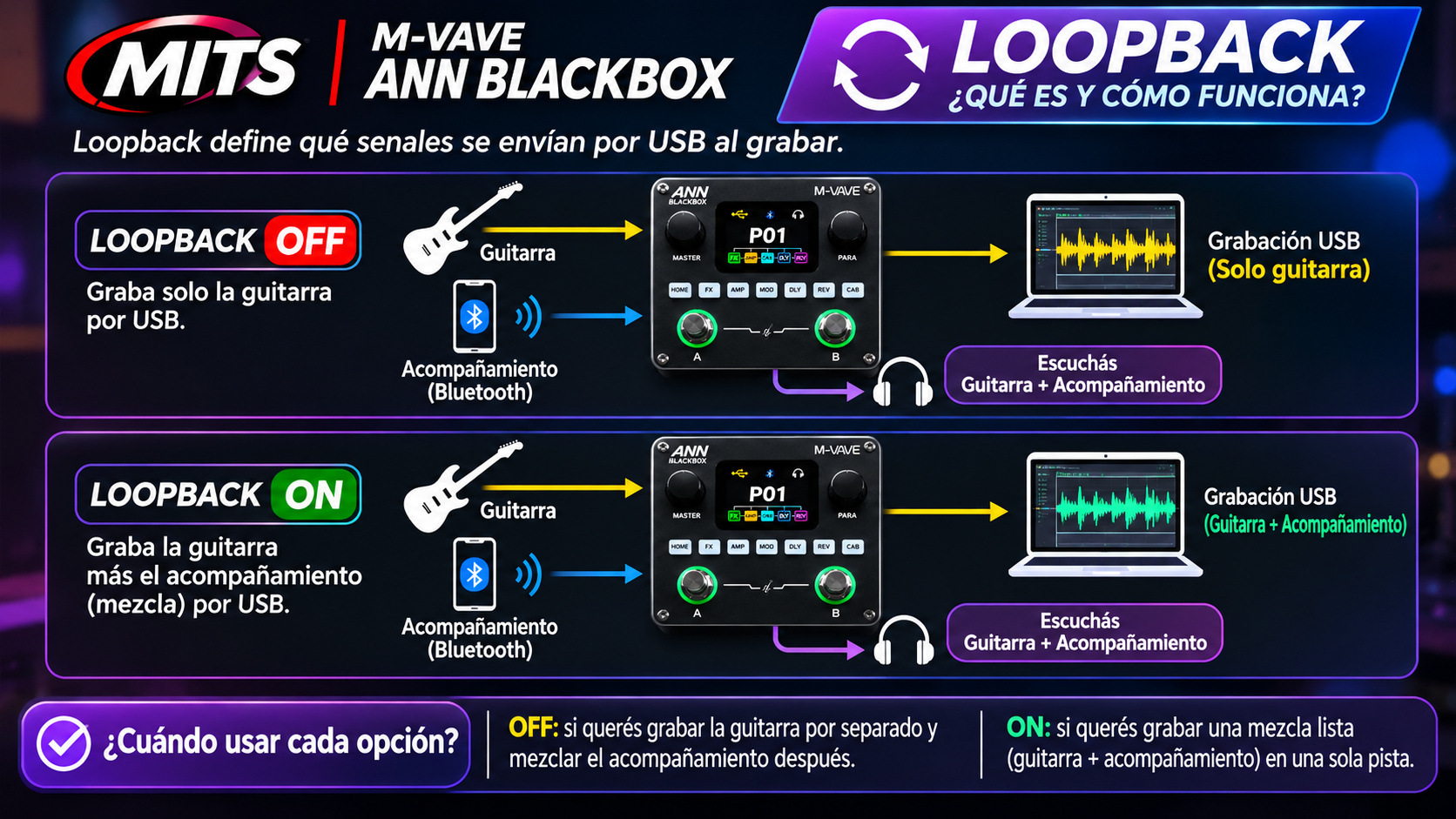
The Loopback feature allows guitar audio to be combined with backing tracks coming from USB or Bluetooth during recording.
With V22, M-VAVE reports that simultaneous guitar and backing-track recording has been restored.
This functionality can be useful for:
- Recording guitar over a backing track.
- Capturing audio from a computer.
- Recording with compatible mobile devices.
- Recording guitar together with audio played through USB or Bluetooth.
The update also fixes audio anomalies that could occur when changing Loopback settings.
¶ 3. New Rec Master Feature
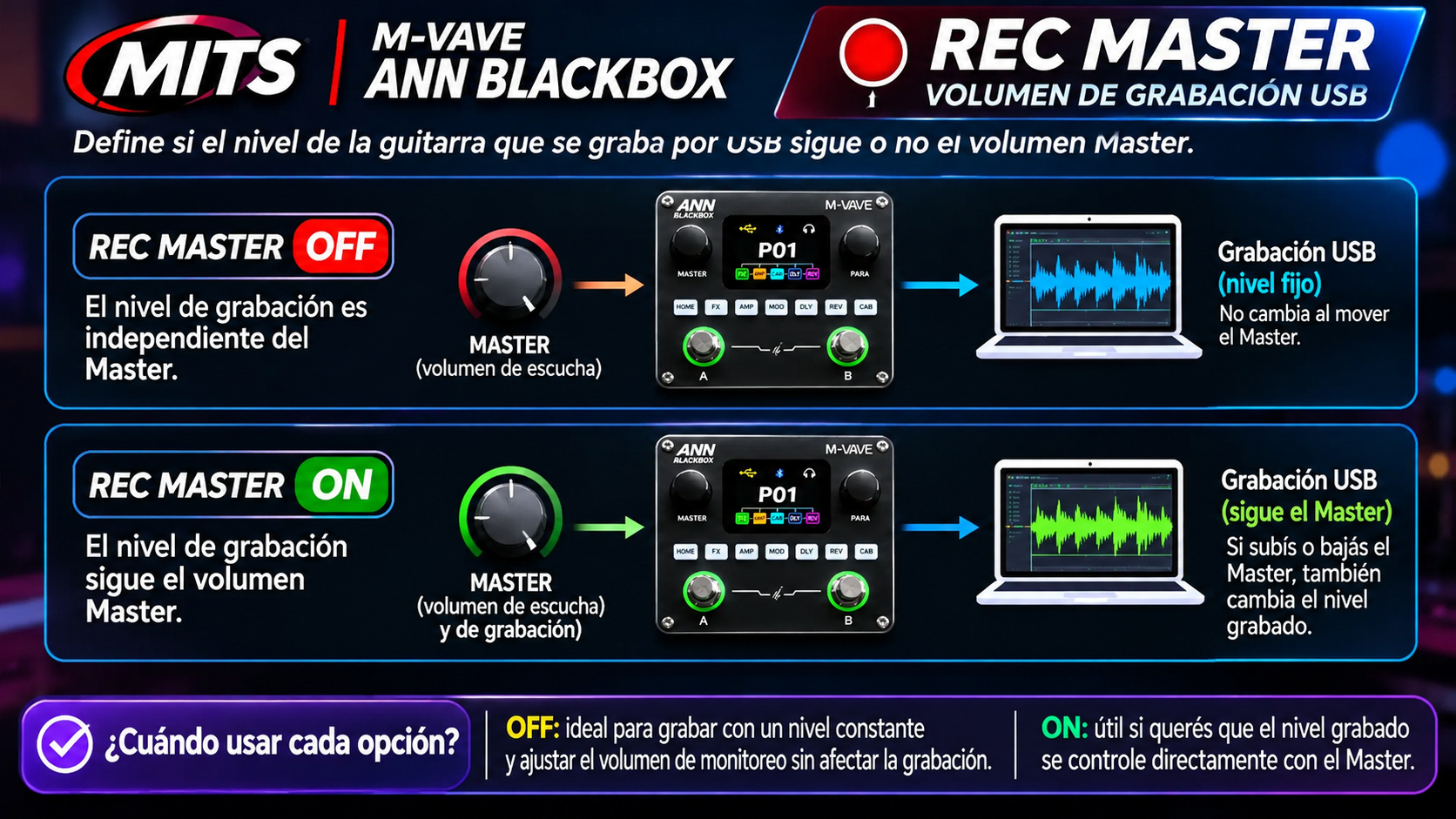
Firmware V22 introduces a new option called Rec Master, available in the ANN BlackBox Settings menu.
This feature allows users to choose whether the guitar recording level sent over USB follows the Master volume control.
| Setting | Behavior |
|---|---|
| Off (default) | The USB recording level is independent of the Master volume. |
| On | The USB recording level follows Master volume adjustments. |
¶ Rec Master Off
This setting allows you to adjust the monitoring volume without changing the guitar signal level being recorded through USB.
It is useful when you need to monitor your guitar at different volumes while maintaining a consistent recording level.
¶ Rec Master On
The guitar recording level changes along with the Master volume control.
This allows the recording level to be controlled directly from the pedalboard.
The setting applies to both standard recording and Loopback recording, and the selected configuration is saved.
Note: After upgrading to V22, Rec Master is set to Off by default.
¶ 4. New Recovery Mode
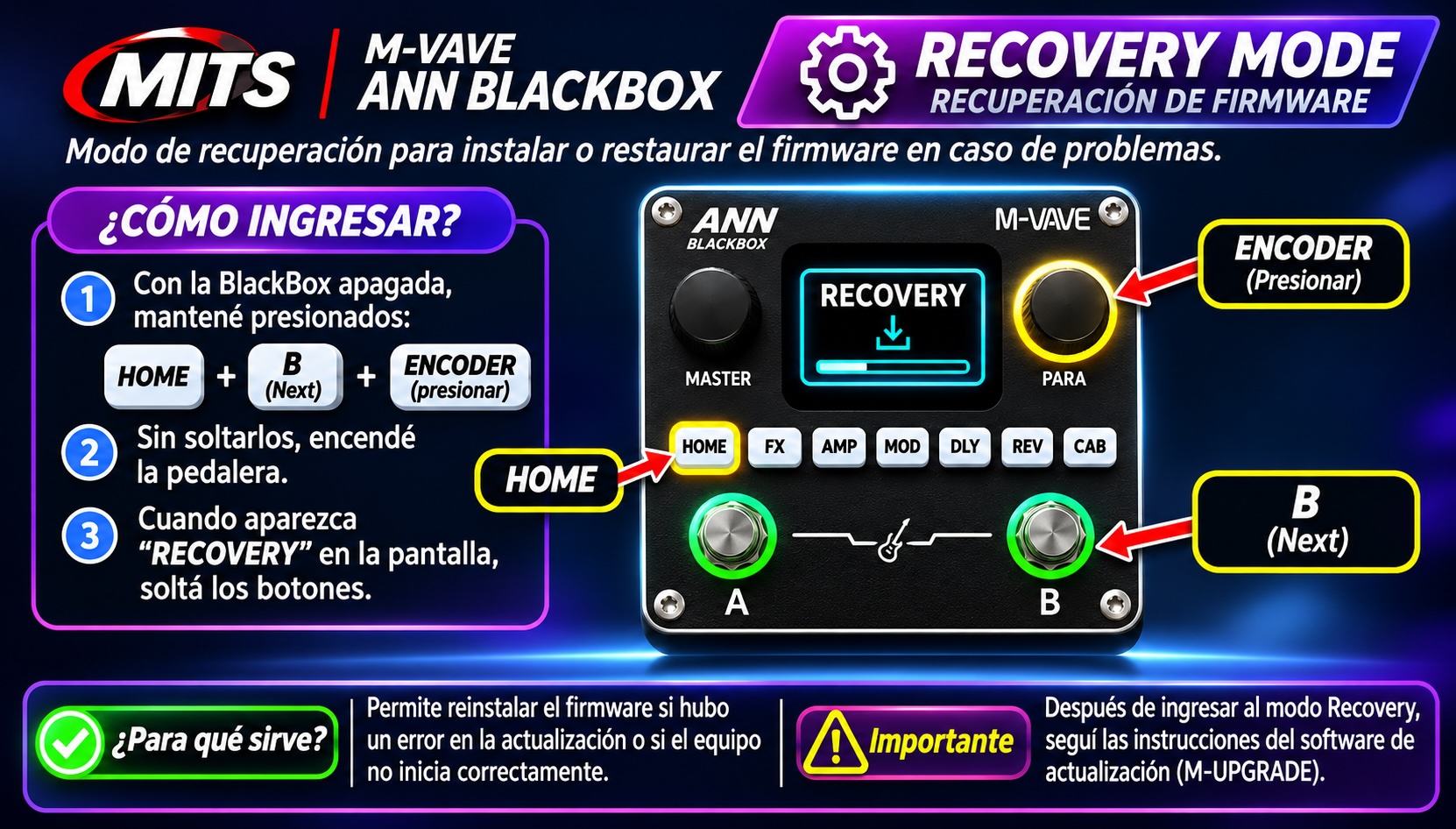
Firmware V22 introduces a new firmware recovery feature called Recovery Mode.
This mode is designed to support future firmware updates and recovery procedures.
¶ How to Enter Recovery Mode
- Turn off the ANN BlackBox.
- Press and hold the following buttons simultaneously:
- Home button.
- Next Preset (>) button.
- Encoder knob button.
- Power on the device while holding all three buttons.
- Release the buttons when RECOVERY appears on the screen.
M-VAVE states that future firmware updates will use this new recovery mode to provide a safer update process.
The traditional M-UPGRADE method will remain available.
¶ 5. Bluetooth Improvements
Firmware V22 fixes an issue where the BlackBox did not automatically attempt to reconnect to previously paired Bluetooth devices.
When Bluetooth is enabled, the device can now automatically initiate reconnection to remembered devices.
¶ 6. Visual Improvements and NAM Model Identification
This update also includes several minor user-interface improvements.
CHAIN Screen
The connection lines have been realigned to match the center of the effect icons.
PLAY Screen
The horizontal signal-chain line alignment has been corrected.
NAM Model Identification
When auditioning a NAM model through the desktop software, the BlackBox now correctly displays PC NAM instead of PC AMP.
¶ 7. What Happens to Your Settings After Updating?
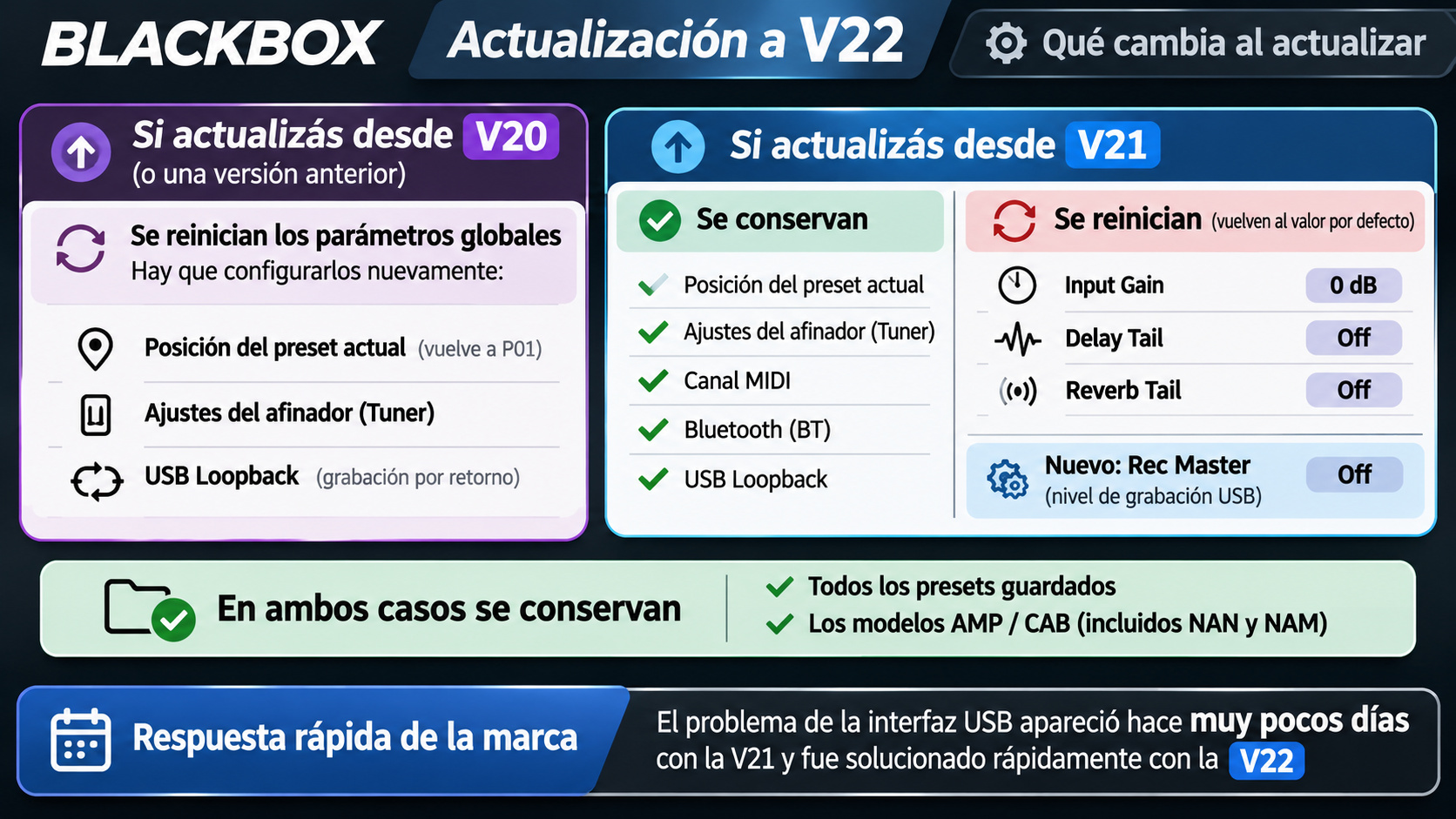
M-VAVE confirms that saved presets and AMP/CAB models are preserved after the firmware update.
However, some global parameters may return to their default values.
¶ Upgrading from V21
The following settings are preserved:
- Current preset position.
- Tuner settings.
- MIDI channel.
- Bluetooth settings.
- Loopback settings.
- Saved presets and AMP/CAB models.
The following parameters are reset:
| Parameter | Value After Updating |
|---|---|
| Input Gain | 0 dB |
| Delay Tail | Off |
| Reverb Tail | Off |
| Rec Master | Off |
Important: If you previously customized Input Gain, Delay Tail, or Reverb Tail, you will need to configure them again after updating.
¶ Upgrading from V20 or Earlier
Global settings are restored to their default values.
This includes:
- Current preset position, which returns to P01.
- Tuner settings.
- USB Loopback configuration.
- Other global parameters.
Saved presets and AMP/CAB models are preserved.
¶ 8. Reminder: Delay Tail and Reverb Tail
These features were introduced in firmware V21 and allow users to control what happens to delay repetitions and reverb tails when an effect is disabled or a preset is changed.
Both features offer three settings:
| Mode | Behavior |
|---|---|
| Off | Effect tails are not preserved when disabling the effect or changing presets. |
| Auto | The device automatically manages effect-tail preservation. |
| Force | Forces effect-tail preservation according to the effect's behavior. |
Important: After upgrading from V21 to V22, both settings return to Off.
If you were using these features, remember to check their configuration after updating.
¶ 9. MITS Video: Firmware V22 and Real-World Testing
At MITS, we explore the new features introduced in ANN BlackBox firmware V22 and perform real-world tests to evaluate its USB audio interface functionality.
Our tests include connecting the BlackBox to Logic Pro on macOS and recording with an iPad, along with demonstrations of the new firmware features.
Video: Coming soon on the MITS YouTube channel.
¶ 10. Official Firmware Download
Firmware updates and software tools are available from the official M-VAVE website.
Official ANN BlackBox Product Page — M-VAVE
We recommend downloading firmware files directly from the manufacturer and reviewing the update instructions before installing.
Information based on the official M-VAVE firmware V22 release notes dated November 12, 2026.
MITS — Music technology, reviews, and real-world testing.
¶ Firmware 21 — November 2026
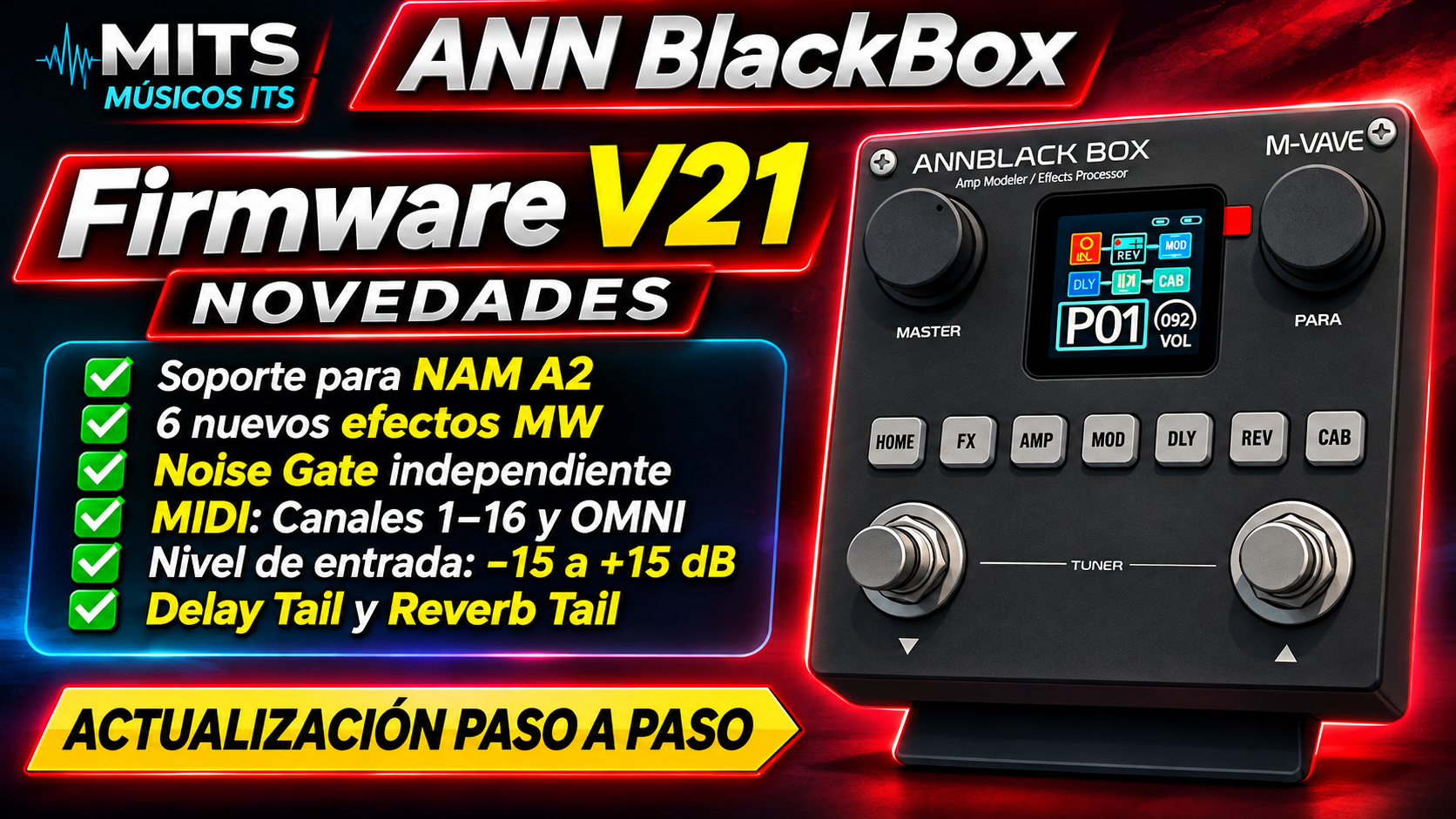
The M-VAVE ANN BlackBox introduces significant new features with Firmware V21, expanding the unit's capabilities with NAM A2 support, new MW effects, improved MIDI control, and additional audio processing options.
At MITS, we explore the new features introduced in this update and show how to use them in real-world situations.
¶ Main New Features in Firmware V21
¶ NAM A2 Support
One of the most important additions is NAM A2 support, expanding the possibilities for using amplifier models based on Neural Amp Modeler.
It is important to distinguish between the unit's traditional amplifier modeling and NAM models, as they use different technologies and formats.
NAM A2 compatibility does not necessarily mean that every NAM file can be loaded directly without conversion or preparation. You must use the formats and procedures supported by the unit's software.
¶ Six New MW Effects
Firmware V21 introduces six new MW effects to the ANN BlackBox's processing options.
These effects provide additional distortion and saturation possibilities, ranging from classic fuzz sounds to overdrives and distortions.
¶ Independent Noise Gate
The update introduces an independent Noise Gate, providing additional control over unwanted noise in effect configurations.
This is especially useful when working with high-gain sounds, fuzz, and distortion.
¶ MIDI Improvements
Firmware V21 introduces MIDI configuration options for:
- MIDI channels 1 through 16.
- OMNI mode.
These options allow the unit to receive MIDI messages according to different controller and pedalboard configurations.
At MITS, we use the ANN BlackBox together with the M-VAVE Chocolate MIDI, making these improvements particularly interesting for controlling the unit within a compact pedalboard.
¶ Input Level Adjustment
The update introduces an input level control with a range of:
-15 dB to +15 dB
This adjustment allows the input signal to be adapted to different guitars, pickups, and signal levels.
It is important to distinguish the input level from the final preset volume, since changing the input level can affect the response of subsequent processing blocks.
¶ Delay Tail and Reverb Tail
Firmware V21 introduces options to control how delay and reverb tails behave when switching presets.
These functions can help create smoother, more natural transitions between different sounds.
¶ The Six New MW Effects

Firmware V21 introduces six new effects that expand the ANN BlackBox's distortion and saturation capabilities.
¶ MW-FACE
A Fuzz Face-style effect designed for classic fuzz sounds.
It allows you to explore vintage-style saturation, from softer tones to intense fuzz sounds.
Available controls shown:
- Gate
- Fuzz
- Level
¶ MW-MUFF
A Big Muff-style effect designed for fuzz sounds with strong sustain and saturation.
It is an interesting option for riffs, solos, and sounds requiring compression and long sustain.
Available controls shown:
- Gate
- Sustain
- Tone
- Level
¶ MW-RAT
A RAT-style distortion effect that allows you to explore sounds ranging from aggressive overdrive to higher-gain distortion.
The Filter control adjusts the tonal character of the distortion.
Available controls shown:
- Gate
- Gain
- Filter
- Level
¶ MW-OCD
An OCD-style overdrive effect designed for different levels of overdrive and saturation.
It includes filtering and configuration options that allow you to modify the effect's response.
Available controls shown:
- Gate
- Gain
- Tone
- LP/HP
- Version
- Level
¶ MW-GOLD
An overdrive effect that allows you to work with different gain levels and adjust the tonal character of the sound.
Available controls shown:
- Gate
- Gain
- Tone
- Level
¶ MW-808
A Tube Screamer 808-style effect, particularly useful as an overdrive or for boosting an amplifier's input.
It can be used to add saturation or modify the response of a high-gain sound.
Available controls shown:
- Gate
- Gain
- Tone
- Level
The values shown in the image are reference settings used to demonstrate the controls of each effect. Every player can adjust them according to their guitar, amplifier, monitoring system, and desired sound.
¶ Delay Tail and Reverb Tail: What Are They and Why Do They Matter?
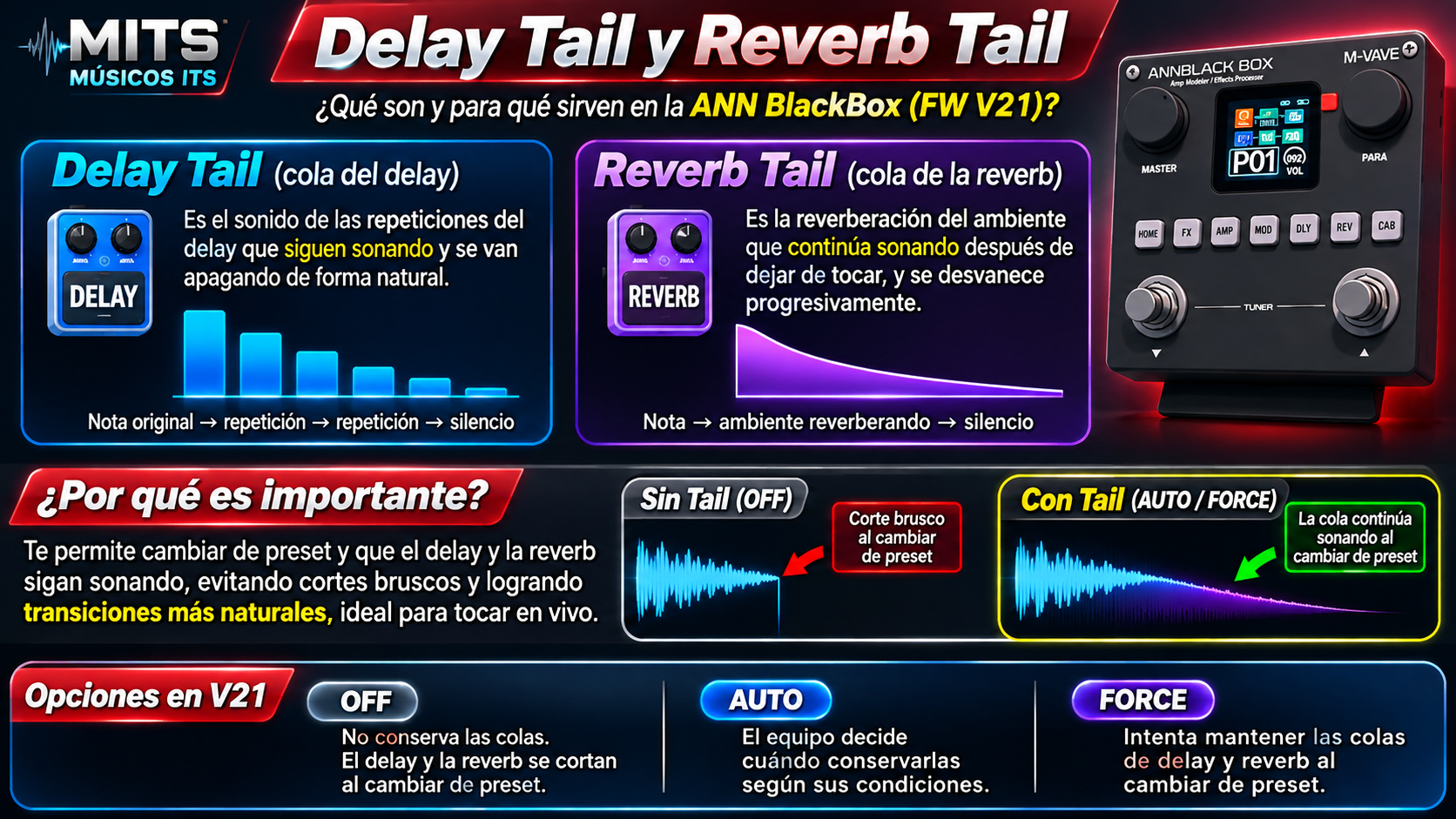
One of the interesting new features in Firmware V21 is the ability to control how delay and reverb tails behave when switching presets.
¶ What Is Delay Tail?
Delay Tail refers to the delay repetitions that continue sounding after you play a note.
When switching presets, preserving the delay tail allows those repetitions to fade out naturally instead of stopping abruptly.
¶ What Is Reverb Tail?
Reverb Tail refers to the reverberation that continues sounding after you stop playing.
It preserves the sense of space and ambience while the sound gradually fades away.
¶ Why Are They Important?
When using different presets during a song, switching between them can cause abrupt cuts in delay repetitions or reverb ambience.
Tail options can help achieve smoother transitions, especially when playing live.
¶ Available Options in Firmware V21
| Option | Behavior |
|---|---|
| OFF | Does not preserve delay or reverb tails when switching presets. |
| AUTO | The unit decides when to preserve the tails based on its operating conditions. |
| FORCE | Attempts to maintain delay and reverb tails when switching presets. |
The actual result may depend on the effects configuration and the unit's processing conditions.
¶ MITS Video — Firmware 21 (NAM)
On our YouTube channel, we demonstrate the new features introduced in Firmware V21 and how to use them on the ANN BlackBox.
Video: ANN BlackBox Firmware 21 (NAM) — New Features and Step-by-Step Update
▶ Watch on YouTube — ANN BlackBox Firmware 21 (NAM)
¶ Upcoming MITS Videos About Firmware 21
We will continue performing practical tests to explore the ANN BlackBox's capabilities with this firmware version.
¶ ANN BlackBox Firmware 21 (NAM) — USB Audio Interface on Mac and Mobile
We will test whether the BlackBox works as a USB audio interface by performing connection and recording tests on Mac computers and mobile devices.
The goal is to verify its capabilities and identify any limitations encountered during testing.
¶ ANN BlackBox Firmware 21 (NAM) — New Effects
We will test the six new MW effects, listen to their differences, and demonstrate how to adjust their parameters to create different sounds.
Links to both videos will be added once they are published.
¶ Official Resources
¶ 🌐 Official M-VAVE ANN BlackBox Page
https://www.m-vave.com/product?id=annblack-box
¶ 💻 M-EFCS
https://www.m-vave.com/m_efcs_download
¶ 🔧 Downloads and Firmware
https://www.m-vave.com/download
¶ MITS Resources
This page is part of the MITS Equipment Profiles.
As we continue using the ANN BlackBox, we will add:
- presets used at MITS
- MIDI configurations
- Chocolate MIDI integration
- practical tests
- preset level matching
- related videos
- our own files and resources
At MITS, our goal is to understand how the equipment works and how to integrate it into a real-world workflow.